
MenuMagic

MenuMagic

PROJECT

Team-project

KEY CONTRIBUTIONS

Prototype

Wireframing

Interaction developing

3D modeling

TOOL

Figma, Lens Studio, Cinema 4D

PROJECT

Team-project

KEY CONTRIBUTIONS

Prototype

Wireframing

Interaction developing

3D modeling

TOOL

Figma, Lens Studio, Cinema 4D

PROJECT

Team-project

TOOL

Figma, Lens Studio, Cinema 4D

CONTRIBUTIONS

Prototype

Wireframing

Interaction developing

3D modeling

MenuMagic

Overview

Problem

Static menus, even when they include photos, fail to convey the full reality of a dish. This gap leaves diners guessing, creating uncertainty that leads to safe but unsatisfying choices.

Project Vision

The goal of this project is to enhance the dining experience through AR technology, replacing menu uncertainty with visual clarity and nutritional transparency. This

  • Eliminates guesswork

  • Fostering trust between customers and restaurants

  • Enabling more confident ordering decisions and stronger business relationships.

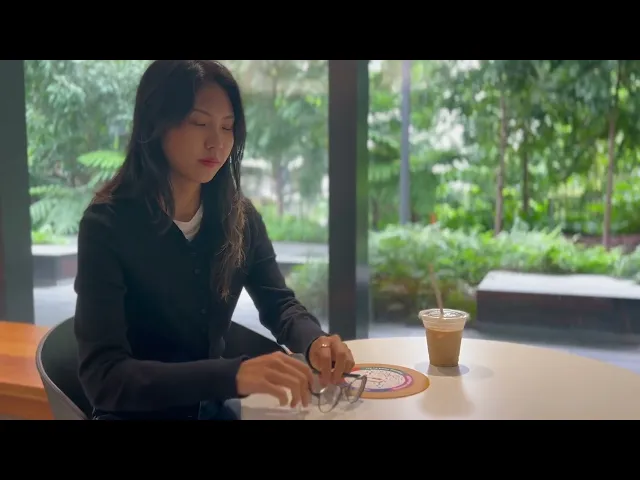
Project Video

Core Features

Interactive Spatial Menus

Diners can Interact with AR menu naturally through intuitive hand gestures and spatial controls with the help of visual guided navigation, creating a seamless AR dining experience.

Visual & Nutritional Transparency

Enable diners to preview dishes in 3D while accessing essential dietary and nutritional information.

Research

Customer Research

We conducted interviews with 7 participants who had previous experience with traditional paper menus. These conversations revealed more than just the struggle of no visuals—they uncovered key pain points throughout the ordering process, from initial decision-making challenges to post-meal disappointment.

These insights revealed 3 key patterns:

#1 Decision Paralysis & Disappointment

I spend too much time deciding because I'm afraid the food won't match my expectations —then I feel like I wasted money when it doesn't.

#2 Cultural Cuisine Barriers

I want to try ethnic dishes like 'Char Siu Bao,' but when descriptions don't explain or show what it is, I have no idea what I'm ordering.

#3 Awkward Information Seeking

I hate to ask the server a million questions about menu items—I worry they're getting annoyed, and I feel like I'm being high-maintenance.

Desk Research — Why AR over static menus?

To address the dining challenges revealed in our customer research, we explored how AR technology could overcome paper menus' limitations and deliver benefits for both customer experience and business growth.

Paper Menu

Limited - static text descriptions and occasional photos

Limited text descriptions and occasional photos

Paper Menu

Dependent on server availability and explanations

Paper Menu

Passive reading experience with minimal interaction

AR Menu

3D visualizations with comprehensive nutritional data and ingredient details

Customer

  • Make informed choices aligned with dietary needs

  • Visual previews eliminate ordering uncertainty

  • Access detailed nutritional and allergen information instantly

Business

Increased Average Order Value:

  • Detailed visuals encourage menu exploration

  • Customers discover dishes they'd overlook in text-only menus

AR Menu

On-demand information access with intuitive navigation

Customer

  • Browse at own pace without pressure

  • Access instant translations for international cuisines

  • Get immediate answers to dietary questions, especially during peak dining hours

Business

Operational Efficiency:

  • Handle unlimited simultaneous customers

  • Reduced communication errors

  • Improved table turnover rates

AR Menu

Interactive, shareable moments that transform ordering

Customer

  • Menu browsing becomes entertaining experience

  • Creates memorable dining moments

Business

  • Unique AR experiences drive social media sharing

  • Natural attraction for new customers

Paper Menu

Passive reading experience with minimal interaction

AR Menu

3D visualizations with comprehensive nutritional data and ingredient details

Customer

  • Make informed choices aligned with dietary needs

  • Visual previews eliminate ordering uncertainty

  • Access detailed nutritional and allergen information instantly

Business

Increased Average Order Value:

  • Detailed visuals encourage menu exploration

  • Customers discover dishes they'd overlook in text-only menus

AR Menu

On-demand information access with intuitive navigation

Customer

  • Browse at own pace without pressure

  • Access instant translations for international cuisines

  • Get immediate answers to dietary questions, especially during peak dining hours

Business

Operational Efficiency:

  • Handle unlimited simultaneous customers

  • Reduced communication errors

  • Improved table turnover rates

AR Menu

Interactive, shareable moments that transform ordering

Customer

  • Menu browsing becomes entertaining experience

  • Creates memorable dining moments

Business

  • Unique AR experiences drive social media sharing

  • Natural attraction for new customers

Paper Menu

Limited text descriptions and occasional photos

AR Menu

3D visualizations with comprehensive nutritional data and ingredient details

Customer

  • Make informed choices aligned with dietary needs

  • Visual previews eliminate ordering uncertainty

  • Access detailed nutritional and allergen information instantly

Business

Increased Average Order Value:

  • Detailed visuals encourage menu exploration

  • Customers discover dishes they'd overlook in text-only menus

Paper Menu

Dependent on server availability and explanations

AR Menu

On-demand information access with intuitive navigation

Customer

  • Browse at own pace without pressure

  • Access instant translations for international cuisines

  • Get immediate answers to dietary questions, especially during peak dining hours

Business

Operational Efficiency:

  • Handle unlimited simultaneous customers

  • Reduced communication errors

  • Improved table turnover rates

Paper Menu

Passive reading experience with minimal interaction

AR Menu

Interactive, shareable moments that transform ordering

Customer

  • Menu browsing becomes entertaining experience

  • Creates memorable dining moments

Business

  • Unique AR experiences drive social media sharing

  • Natural attraction for new customers

Research

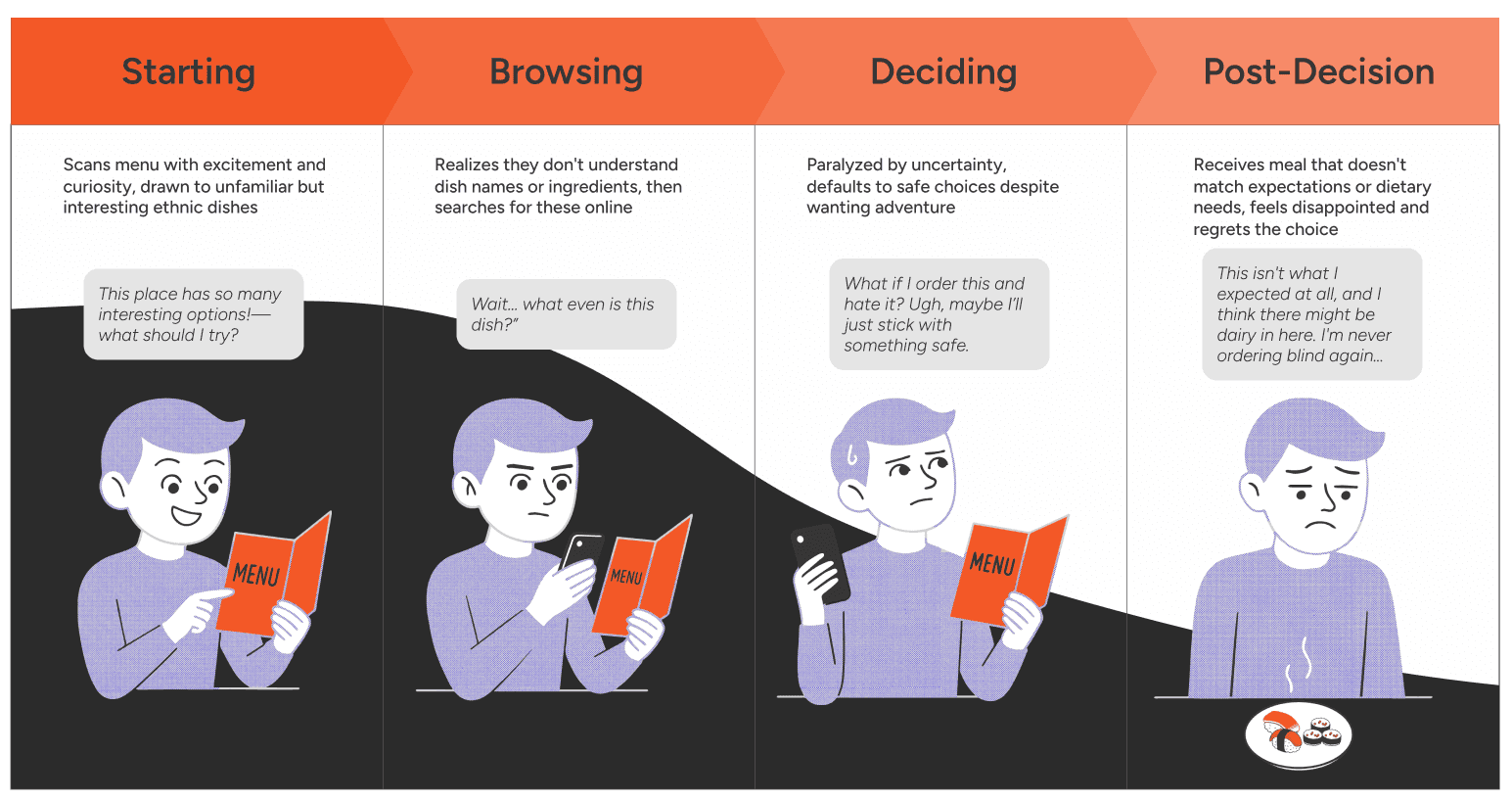
User Journey

We mapped our persona's dining experience with traditional menus, tracking their actions and thoughts at each stage—from initial excitement to final disappointment. This journey revealed critical friction points where AR intervention could transform the experience.
Synthesis

User Persona

Taking research insights into design, we developed a user persona to identify the ideal user who would gain the most value from the Augmented Reality menu. This persona ensured real-world relevance and guided development by keeping us focused on users’ needs.

The Health-Conscious Explorer

The Health-Conscious Explorer

Adventurous, Allergic to Nuts

“As a wellness-focused foodie who loves exploring ethnic cuisines, I want to confidently try new dishes while ensuring every meal aligns with my dietary needs and expectations.

“As a wellness-focused foodie who loves exploring ethnic cuisines, I want to confidently try new dishes while ensuring every meal aligns with my dietary needs and expectations.

Goals

  • Balance exploring new foods while maintaining health-conscious choices

  • Make confident, informed decisions when ordering unfamiliar food

  • Have satisfying dining experiences that align with expectations

Needs

  • Explore diverse ethnic cuisines confidently

  • Access complete ingredient lists for allergen safety

  • View nutritional data to support fitness goals

  • See realistic previews of portions and presentation

Pain Points

  • Ordering blind risks allergen exposure

  • Feels burdensome asking detailed questions to busy servers

  • Cannot assess if portions/preparation align with health goals

  • Googling unfamiliar dish names and foreign ingredients

The Health-Conscious Explorer

Adventurous, Allergic to Nuts

“As a wellness-focused foodie who loves exploring ethnic cuisines, I want to confidently try new dishes while ensuring every meal aligns with my dietary needs and expectations.

Goals

  • Balance exploring new foods while maintaining health-conscious choices

  • Make confident, informed decisions when ordering unfamiliar food

  • Have satisfying dining experiences that align with expectations

Needs

  • Explore diverse ethnic cuisines confidently

  • Access complete ingredient lists for allergen safety

  • View nutritional data to support fitness goals

  • See realistic previews of portions and presentation

Pain Points

  • Ordering blind risks allergen exposure

  • Feels burdensome asking detailed questions to busy servers

  • Cannot assess if portions/preparation align with health goals

  • Googling unfamiliar dish names and foreign ingredients

How might we create informed dining experiences that help diners make confident ordering decisions through spatial menu exploration?

reason

need

user

Ideation

User Flow + Information Architecture
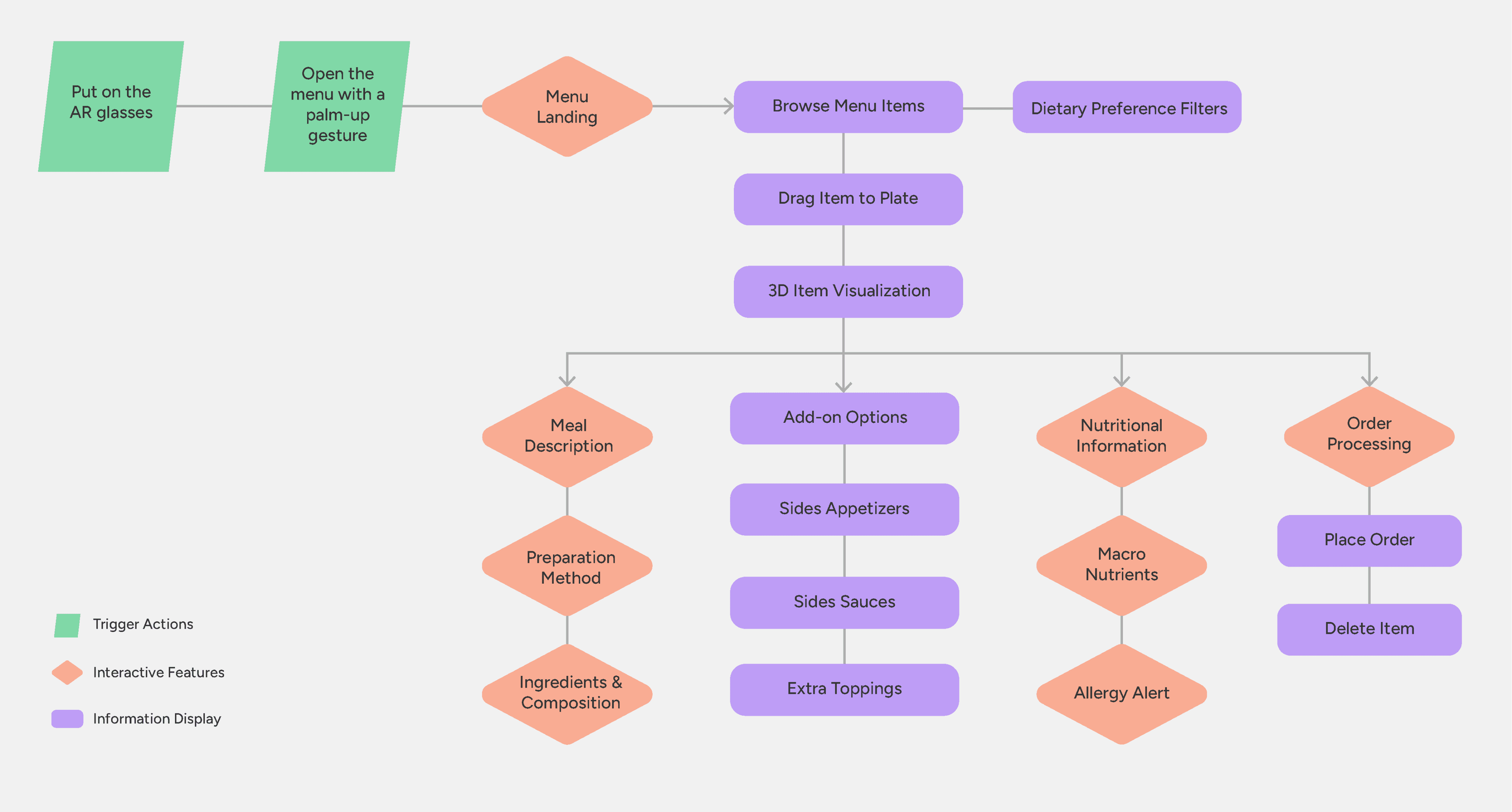
We translated journey insights into a structured user flow and information architecture. This blueprint mapped the optimal user path through each dining stage, ensuring every pain point had a corresponding solution.

Ideation

Developing a Solution

Guided by the User Flow, this application is designed for use with AR glasses. Diners can preview dishes in realistic 3D, customize orders independently, and instantly access dietary information — all through natural spatial interactions. Key features include:

01. Gesture Tracking

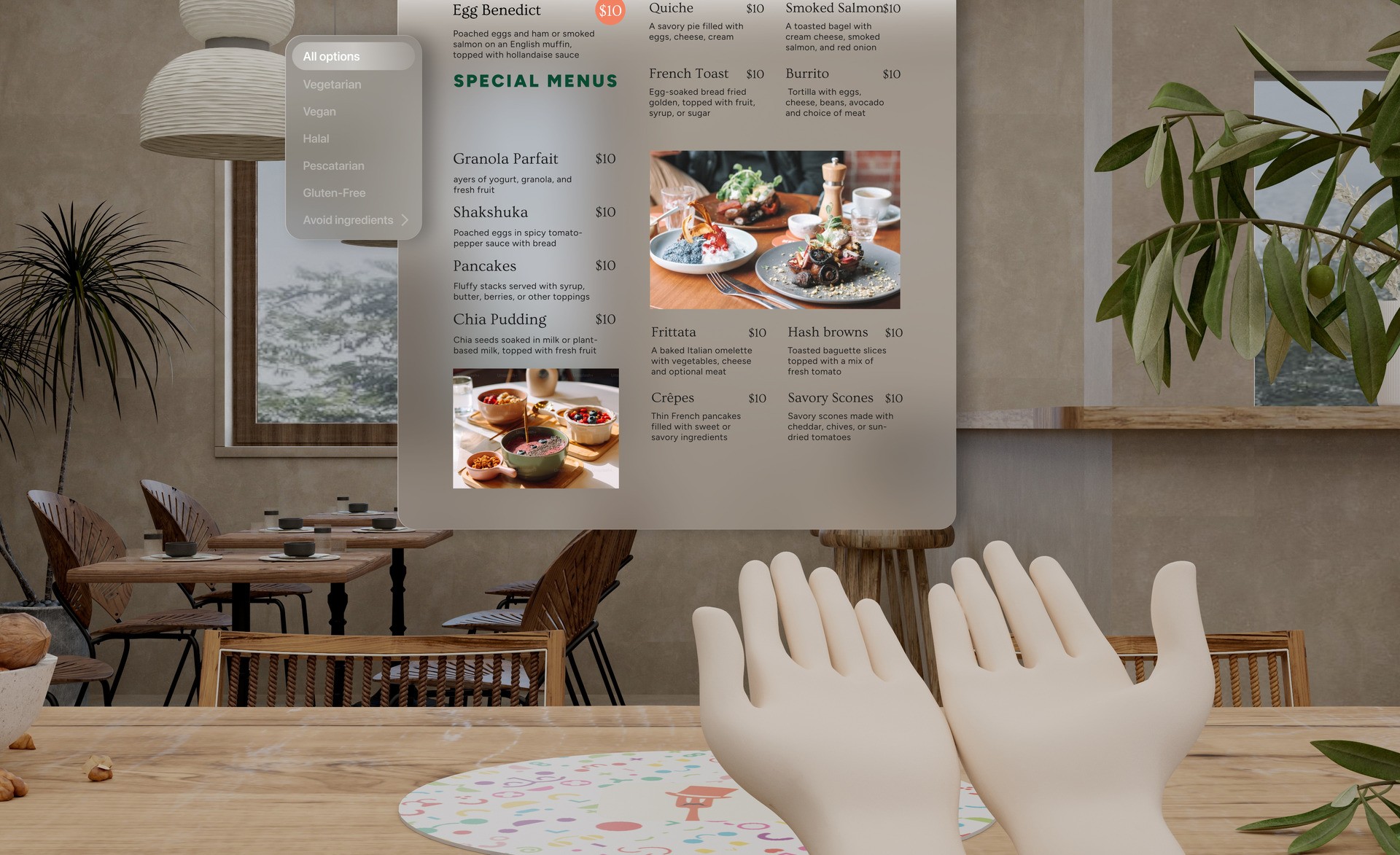
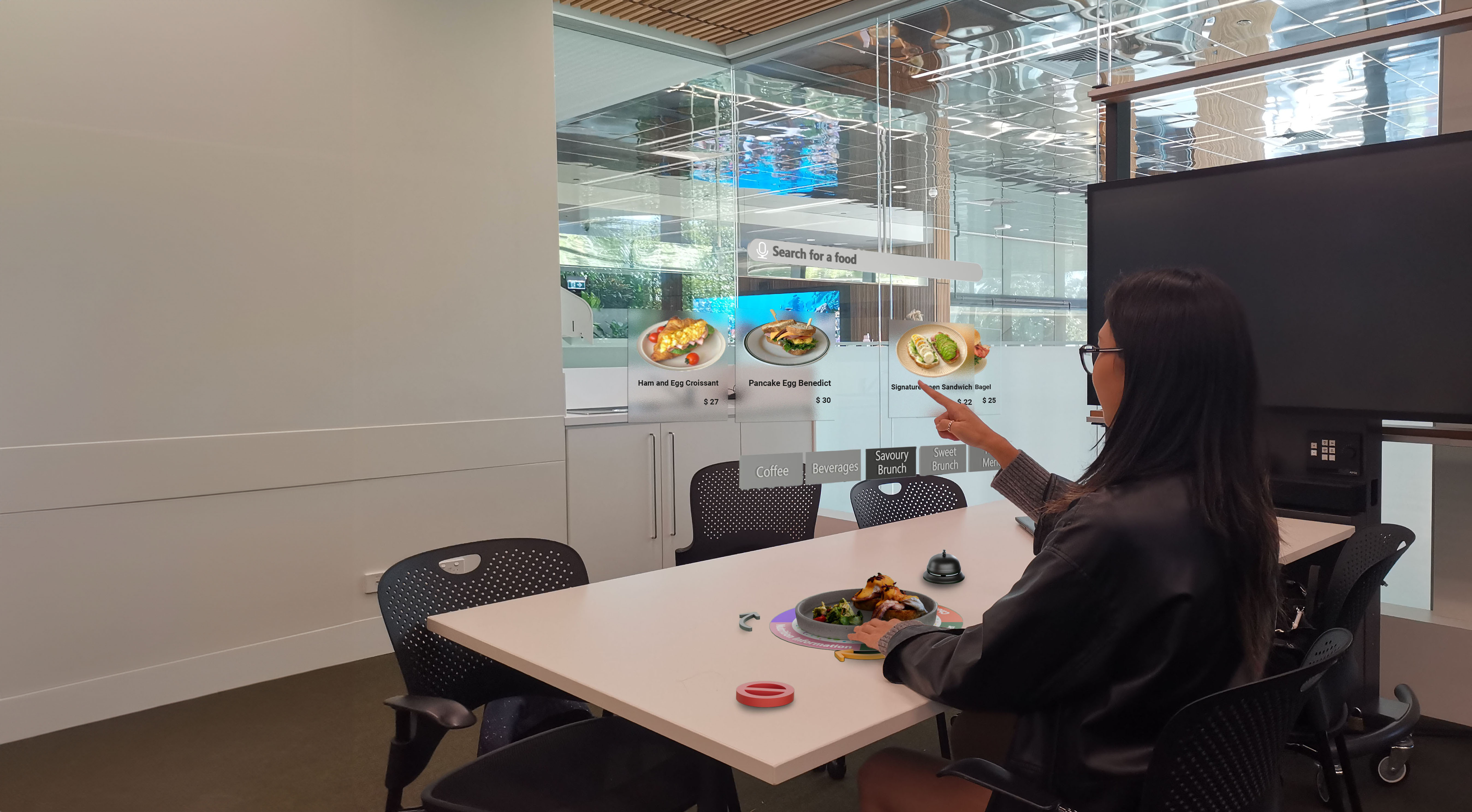
Natural hand gestures control the AR experience — diners performs an opening hand gesture to reveal menu, close it to dismiss, and use grabbing motions to select items.

02. Spatial Placemat Interface

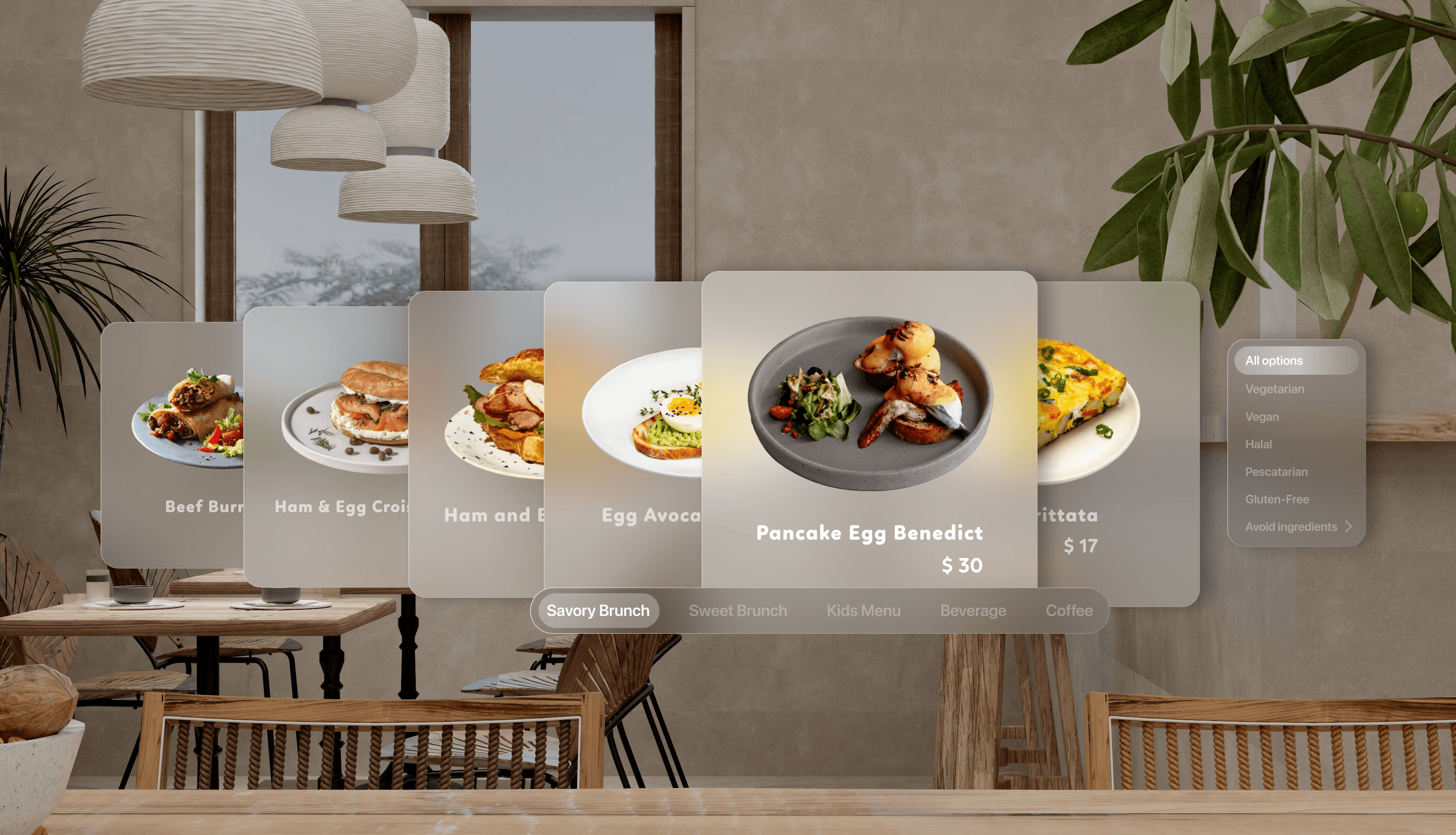
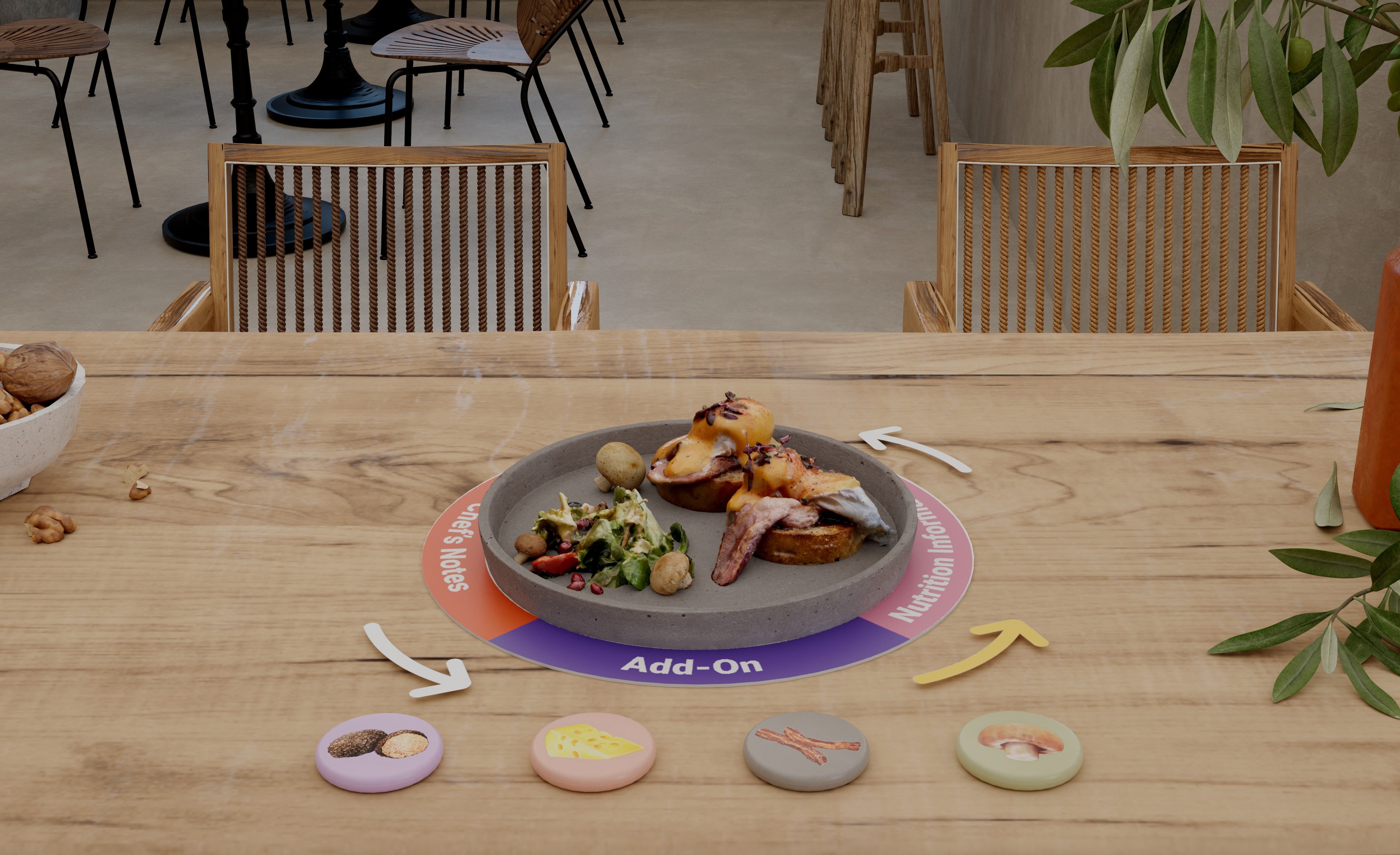
The interactive placemat functions as a contextual interface where virtual dishes materialize within the diner's physical space, enabling self-guided menu exploration and ordering at their own pace.

03. Dietary Preferences Filter

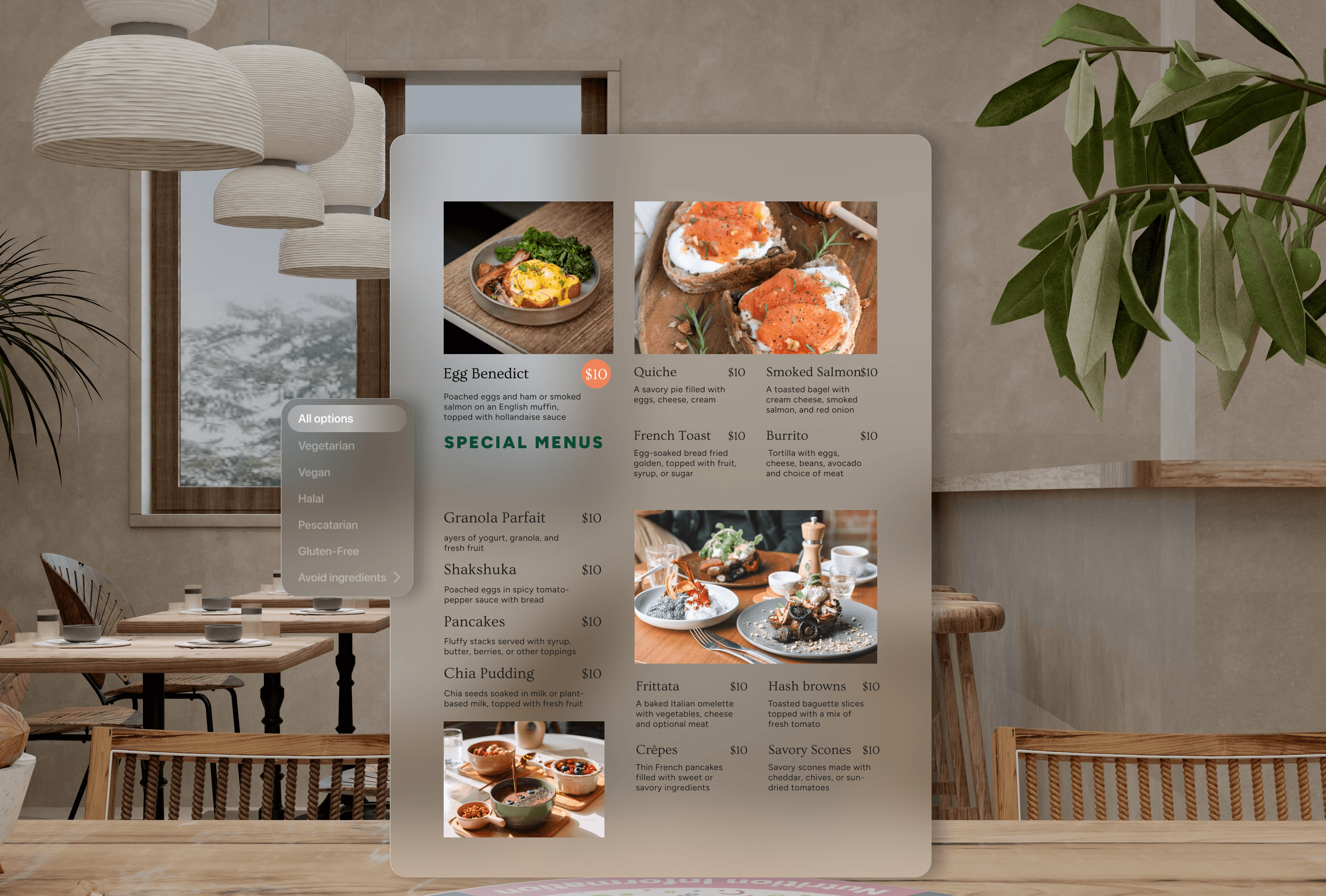
Dietary filters highlight menu items that match specific needs — including allergen-free options, religious restrictions, and personal preferences.

04. 3D Food Visualization with Details:

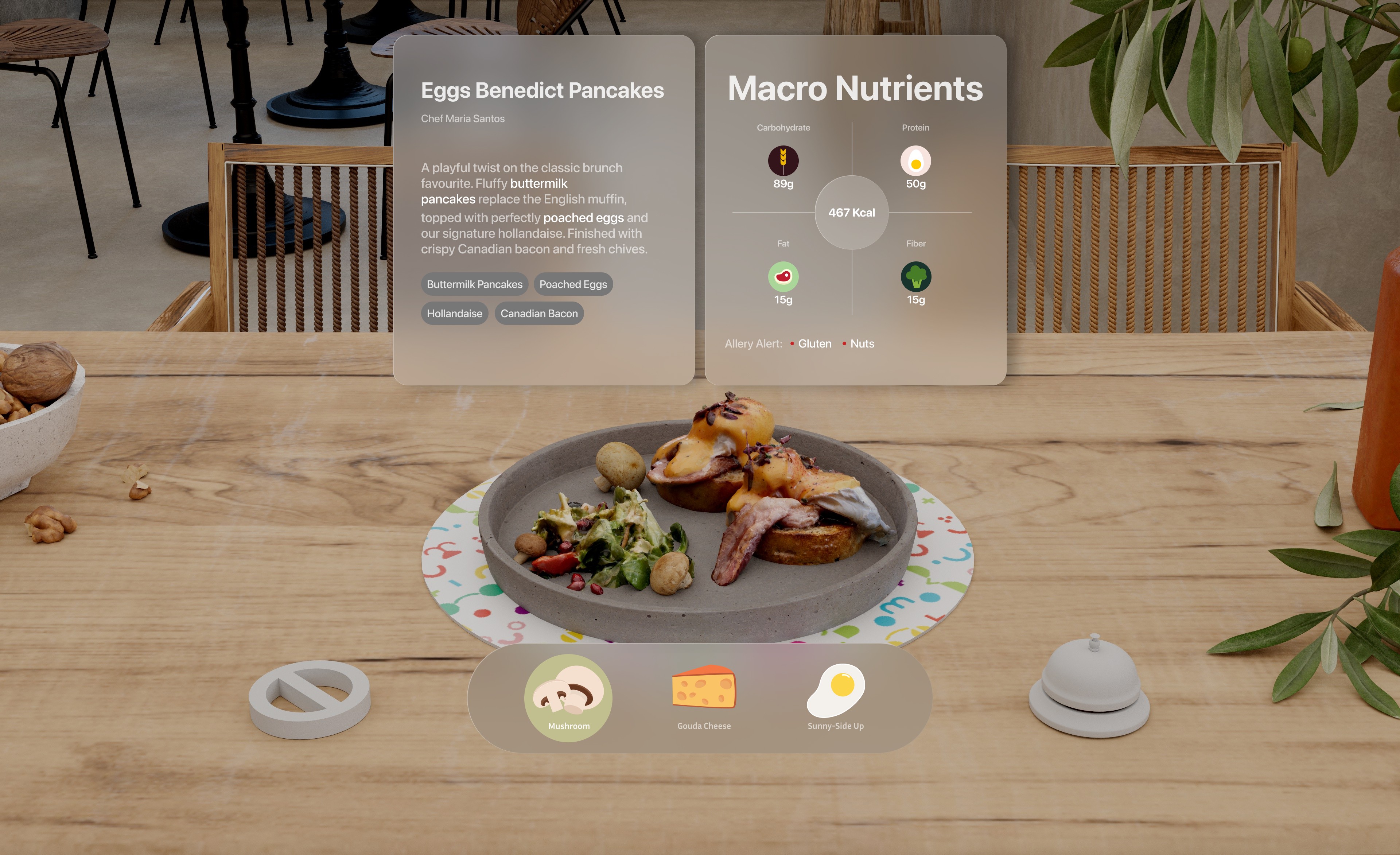
True-to-life food models show portions from every angle, complete with ingredients, nutritional data, and its culinary story stories.

05. Customization Controls

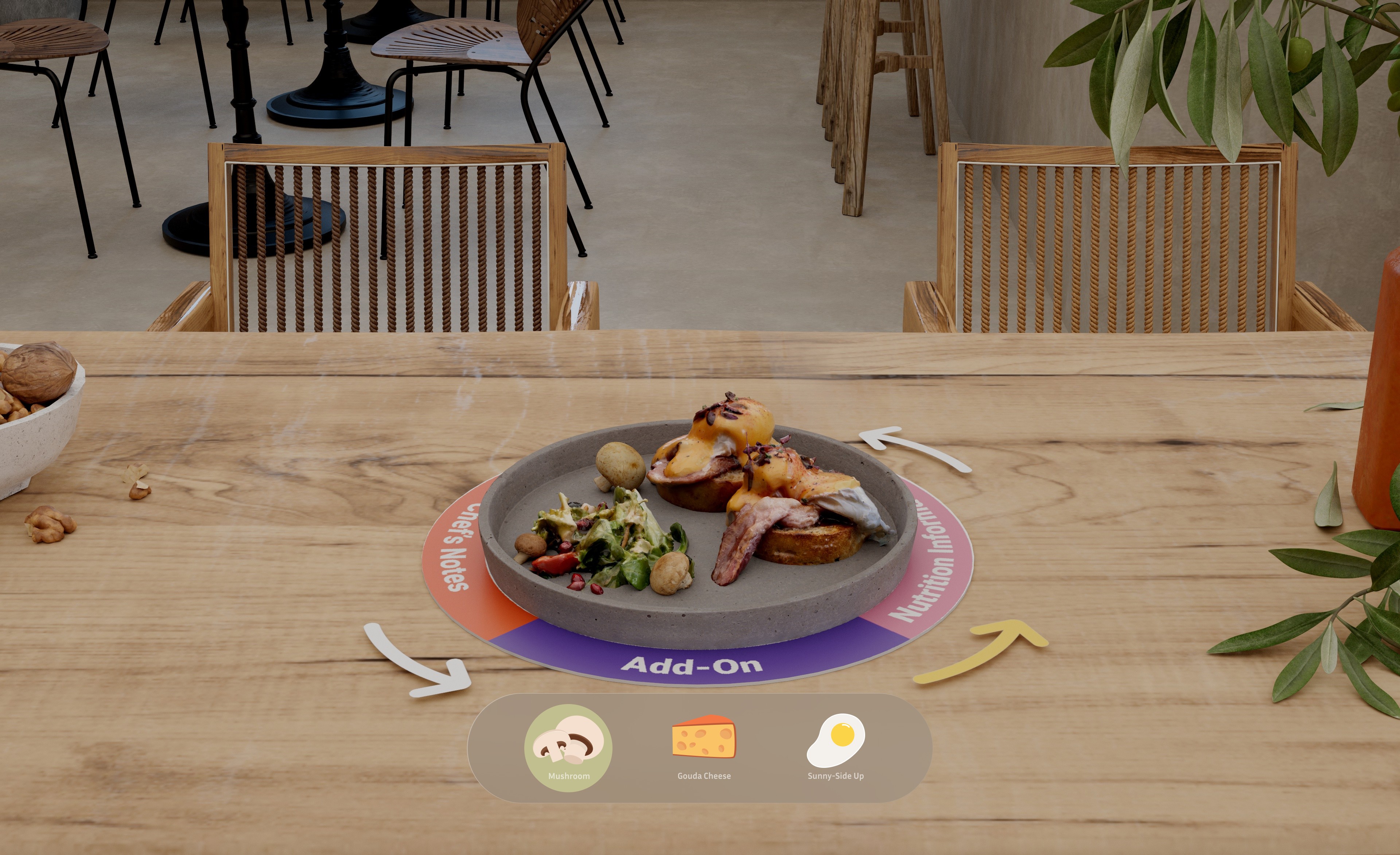
Interactive buttons enable diners personalize their meals—adjusting toppings, sauces, and ingredients to match their preferences.

01. Gesture Tracking

Natural hand gestures control the AR experience — diners performs an opening hand gesture to reveal menu, close it to dismiss, and use grabbing motions to select items.

02. Spatial Placemat Interface

The interactive placemat functions as a contextual interface where virtual dishes materialize within the diner's physical space, enabling self-guided menu exploration and ordering at their own pace.

03. Dietary Preferences Filter

Dietary filters highlight menu items that match specific needs — including allergen-free options, religious restrictions, and personal preferences.

04. 3D Visualization with Details:

True-to-life food models show portions from every angle, complete with ingredients, nutritional data, and its culinary story stories.

05. Customization Controls

Interactive buttons enable diners personalize their meals—adjusting toppings, sauces, and ingredients to match their preferences.

01. Gesture Tracking

Natural hand gestures control the AR experience — diners performs an opening hand gesture to reveal menu, close it to dismiss, and use grabbing motions to select items.

02. Spatial Placemat Interface

The interactive placemat functions as a contextual interface where virtual dishes materialize within the diner's physical space, enabling self-guided menu exploration and ordering at their own pace.

03. Dietary Preferences Filter

Dietary filters highlight menu items that match specific needs — including allergen-free options, religious restrictions, and personal preferences.

04. 3D Visualization with Details:

True-to-life food models show portions from every angle, complete with ingredients, nutritional data, and its culinary story stories.

05. Customization Controls

Interactive buttons enable diners personalize their meals—adjusting toppings, sauces, and ingredients to match their preferences.

Iteration

Design Decision

After visualizing the concept and gathering feedback, I identified three critical iterations that shaped the final experience. Each iteration prompted me to redefine Augmented Interaction, moving beyond 2D constraints and exploring truly spatial possibilities.

Menu Display

Before:

Before:

The traditional overlay approach created a disconnect between digital information and the physical dining environment. Static overlays didn't adapt to user movement or position, simply floating digital layers over the real world.

After:

After:

The spatial AR approach integrates menu browsing naturally into the dining experience. Food visualizations appear contextually within the user's space, repositioning based on head movement and maintaining spatial awareness.

Dish Information Display

Before:

Before:

The initial approach of presenting all dietary information simultaneously created cognitive overload, creating an overwhelming experience.

After:

After:

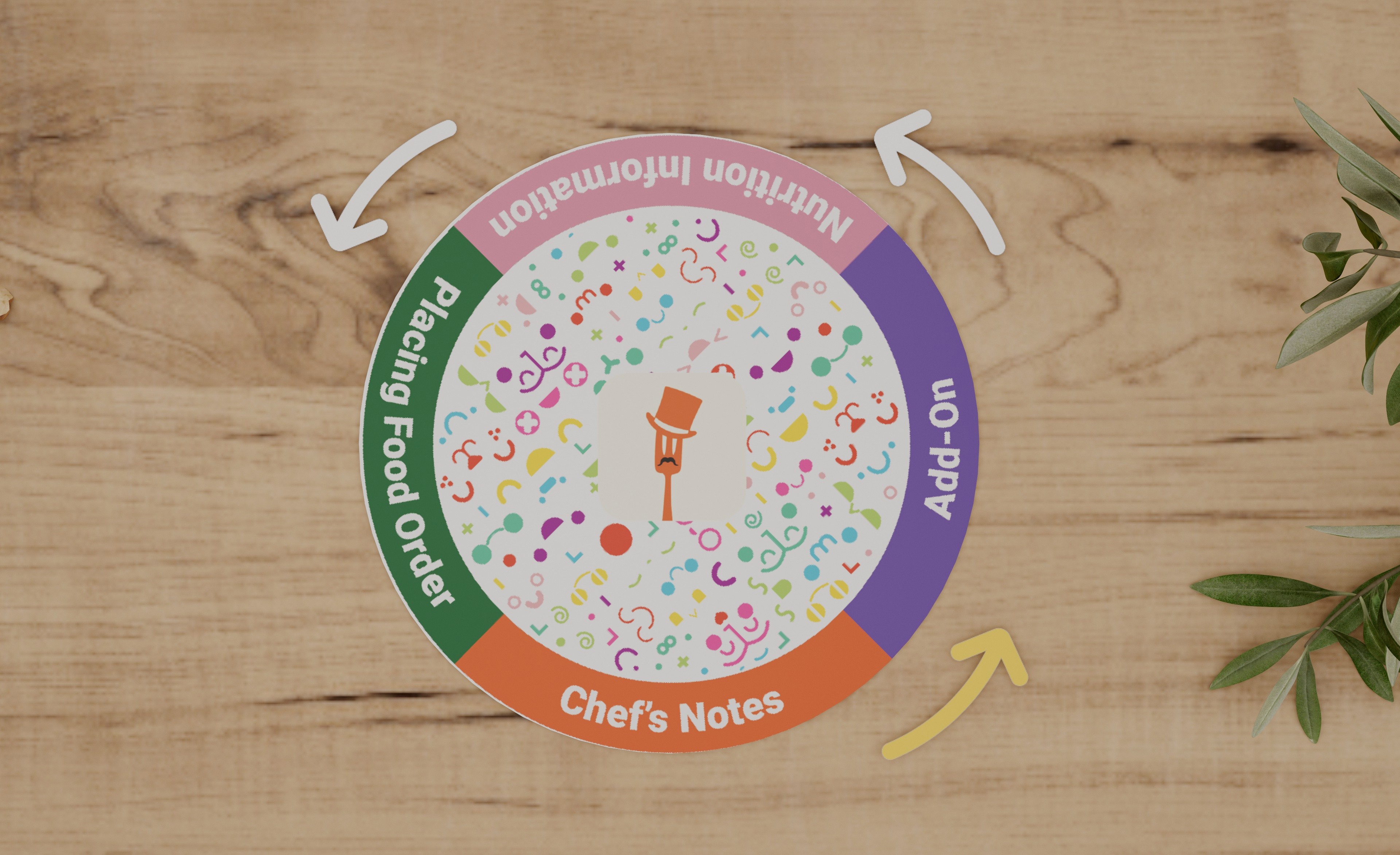
The refined circular interface reveals information progressively through a logical hierarchy. Users control their exploration pace by rotating the physical placemat, with visual arrow guides directing the experience. This transforms information discovery into a self-directed journey.

Interactive Buttons

Before:

Before:

Traditional 2D buttons felt disconnected from the immersive AR visualizations, creating a jarring transition between spatial content and flat controls.

After:

After:

Spatial 3D buttons preserve the immersive experience by responding to natural reaching and touching gestures. Users interact with controls as naturally as they would physical objects, maintaining flow throughout the dining experience.

Menu Display

Before:

The traditional overlay approach created a disconnect between digital information and the physical dining environment. Static overlays didn't adapt to user movement or position, simply floating digital layers over the real world.

After:

The spatial AR approach integrates menu browsing naturally into the dining experience. Food visualizations appear contextually within the user's space, repositioning based on head movement and maintaining spatial awareness.

Dish Information Display

Before:

The initial approach of presenting all dietary information simultaneously created cognitive overload, creating an overwhelming experience.

After:

The refined circular interface reveals information progressively through a logical hierarchy. Users control their exploration pace by rotating the physical placemat, with visual arrow guides directing the experience. This transforms information discovery into a self-directed journey.

Interactive Buttons

Before:

Traditional 2D buttons felt disconnected from the immersive AR visualizations, creating a jarring transition between spatial content and flat controls.

After:

Spatial 3D buttons preserve the immersive experience by responding to natural reaching and touching gestures. Users interact with controls as naturally as they would physical objects, maintaining flow throughout the dining experience.

Final Design

High-Fidelity Concept

We translated MenuMagic's technical capabilities into a polished interaction design that demonstrates the complete dining journey, this high-fidelity concept clearly reveals how our spatial interface operates in practice.

With a simple palm-up gesture, diners awaken the AR menu. Dietary filters allow them to select safe options that match their specific needs

With a simple palm-up gesture, diners awaken the AR menu. Dietary filters allow them to select safe options that match their specific needs

With a simple palm-up gesture, diners awaken the AR menu. Dietary filters allow them to select safe options that match their specific needs

Final Design

Final

LensStudio Prototypes [Proof of Concept]

Moving from concept to reality, We developed a functional prototype using Lens Studio. Despite limited coding experience, I leveraged platform resources and AI assistance to bring core spatial interactions to life, including hand gesture controls and placemat navigation—validating the technical feasibility of our design vision.

Hand gesture menu controls

Hand gesture button controls

Placemat Navigation

What I learned?

Designing With AI, About AI

Spatial design requires moving beyond 2D thinking. Without screen constraints, depth and environment become part of the interface. Embracing this mindset early led to more innovative, medium-native experiences.

Communication is Key

Working in isolation often led to circular thinking, where I'd get stuck on a single idea. Frequent collaboration and open discussion brought different perspectives + diverse insights that acted as the "missing piece," breaking the cycle and leading to stronger solutions.

If I had additional time, I would…

Conduct Ergonomic Usability Testing

Since this design relies on physical gestures,, I would test the prototype on actual AR hardware. I want to validate that these interactions remain comfortable over a full dining session and do not cause "gorilla arm".

What I learned?

Designing With AI, About AI

Spatial design requires moving beyond 2D thinking. Without screen constraints, depth and environment become part of the interface. Embracing this mindset early led to more innovative, medium-native experiences.

Communication is Key

Working in isolation often led to circular thinking, where I'd get stuck on a single idea. Frequent collaboration and open discussion brought different perspectives + diverse insights that acted as the "missing piece," breaking the cycle and leading to stronger solutions.

If I had additional time, I would…

Conduct Ergonomic Usability Testing

Since this design relies on physical gestures,, I would test the prototype on actual AR hardware. I want to validate that these interactions remain comfortable over a full dining session and do not cause "gorilla arm".